
© Copyright by : csoftsystems.com
© Copyright by : csoftsystems.com
Educational Online Courses HTML Template
| Created On: | 30-02-2021 |
|---|---|
| FIrst Update: | 30-02-2021 |
| Developed by: | Csoft Systems |
| Email Us at: | support@csoftsystems.com |
Thank you for purchasing Adocation - Educational Online Courses HTML Template. If you have any questions that are beyond the scope of this help file, please feel free to email, via my user page contact form or put a ticket at Support Center .
Thank you so much!
The html template uses Latest Bootstrap v4.4.1 with valid HTML5 tags. This theme is a responisve layout with 4 column Support column. All of the information in content area is nested within a class and comes with predefined classes.
    <section id="source-credit">
        <h4 class="heading">Sources And Credits</h4>
        <section class="container-fluid my-4">
            <p class="fw-bold">Fonts Used int the template are google fonts, you can find them on Google Fonts API</p>
            <p class="fw-bold">Fonts Used are :</p>
            <ol>
                <li>Manrope</li>
                <li>Montserrat</li>
                <li>Raleway</li>
                <li>Sans Serif</li>
            </ol>

            <p class="fw-bold">File Used For Animation Effects :</p>
            <ol>
                <li>
                    <span class="fw-bold">wow.js</span> (in js Folder)
                </li>
                <li>
                    <span class="fw-bold">bootsnav.js</span> (in js Folder)
                </li>
                <li>
                    <span class="fw-bold">animate.css</span> (in js Folder)
                </li>
            </ol>
            <p class="fw-bold">Sliders Used Are :</p>

            <p>Every Code is properly commented for Editing Ease.</p>

            <p class="fw-bold">Icons Used are :</p>
            <ol>
                <a href="https://flaticon.com" class="link" target="_blank">flaticon.com</a>
                <p>Used flaticons icon pack is attached as a zip with Documentation.</p>
            </ol>

        </section>
    </section>
There are Five main CSS files are used in this theme. The first one bootstrap.min.css, second one is style.css third one is bootstrap.css which for this template and forth one is animate.css fifth one is owl.carousel.min.css to control responsive layouts.
If you want to edit a particular section of the website, then just find the appropriate label in the CSS file, and then scroll down until you find the appropriate class name in the style that needs to be edited.
This theme imports Two types of Javascript files.
Jquery is a fast, small, and feature-rich JavaScript library. jQuery has changed the way that millions of people write JavaScript.
The majority of the animation on this site is done from manual scripts. There are a couple of features worth it observing.
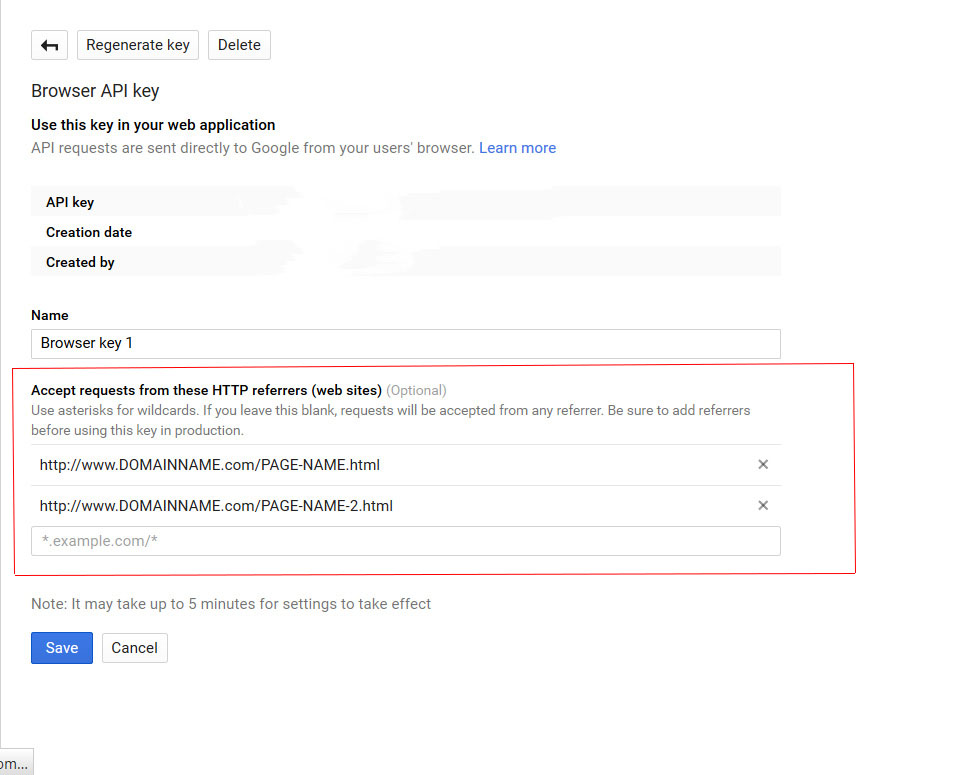
From Now and Onward If you want to use google maps, Google map API key is necessary. For this reason below is a brief description how to generate google api key and where to use in the template.
Without API KEY map will not appear.
You will need to register all those pages on which you are showing Google Map, with respect to your website / domain.
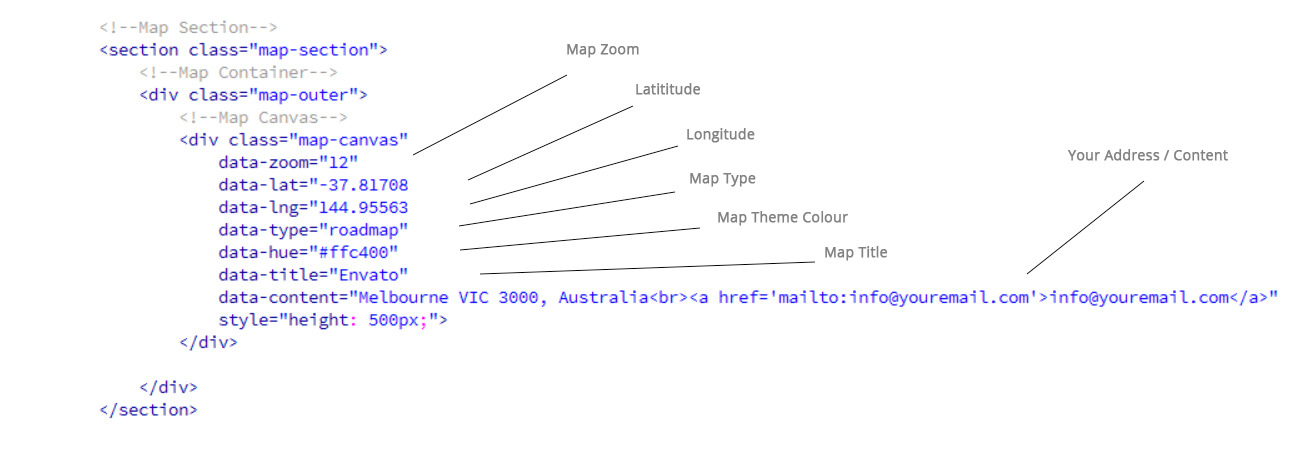
You will find given code at the bottom of the file on which map is located

You have to change Required / Needed Values in Map Container Of the Page. You can also change icon of the marker in the file named map-script.js inside js folder
Edit The Attribute values of DIV class named MAP CAnvas inside Map Container with your credentials.
As Below
We have added an attractive and fully functional contact form in the website. If you need to update you can only change the recipient name and email address.
You can change admin name and email address in contact.php

Fonts Used int the template are google fonts, you can find them on Google Fonts API
File used For Animation Effects :
Fonts Used in this Website :
Sliders used in this website from :
Every Code is properly commented for Editing Purpose.
Icons used in this website:
Used flaticons icon pack is attached as a zip with Documentation.
Used flaticons icon pack is attached as a zip with Documentation.
From Flaticon, Icons are custom selected and downloaded as a fonts & images. If you want to use more icons you need to select icons of your choice from flaticon.com as font files and replace with the already added files.
(Previous Flaticon icons will be removed when you will use your own selected/downloaded Flaticons font)
Once again, thank you very much for purchasing this website. As I said at the start, I am glad to help you if you have any questions related to this website. No guarantees, but I'll do my best to help you. If you have any question related to website, please feel free to contact us at Support Center.
| Our Email Address: | support@csoftsystems.com |
|---|